Second Brain meets Getting Things Done, Part 3: From Manual Tracking to Automated Pipelines
Much of the power behind AI is when automation makes work seamless. Part 1 in this series provided the architecture of my Second Brain while Part 2 provided the core work pieces, in terms of Skills and Bases. In this post, I’ll share two pieces of automation that help enhance my workflow, pulling data from Google Health and exchanging data with Asana.
The Asana automation was the easier of the two, since Claude already has a feature called Connectors which allows you to connect with external tools. Google Health is not yet one of those connectors, so I had to build that connection myself. Let’s start with Asana.
Building the Asana Automation
Setting up Connectors in Claude can be accomplished by clicking on + icon in the chat window, selecting Connectors, then selecting Add Connector. There are now thousands of options, from productivity to personal apps. Apps for Shopping, Education, Health, Productivity, Legal, Marketing, and more. I searched for the Asana app and found it. After a quick authentication of my account and approving Claude’s connection with Asana, I was ready to go.
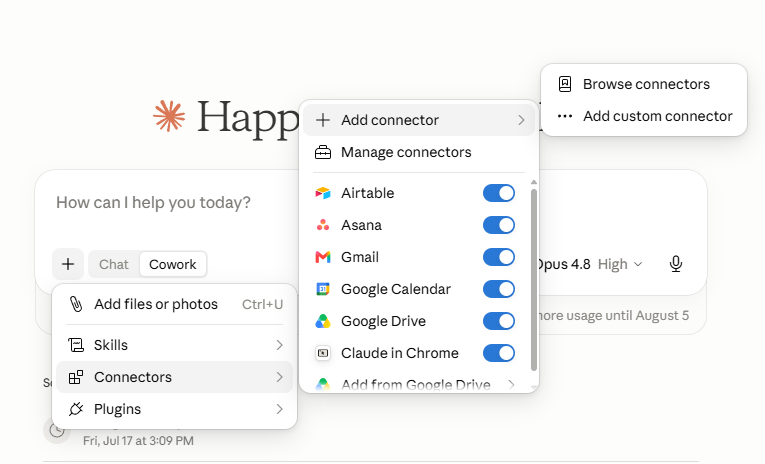
While I can interact with Asana from any chat by clicking the + button, I also integrated Asana interaction with my end-of-day skill. My goal was to keep Asana and my Second Brain in sync for Center projects. Following best practices in data management, I selected one copy to be the “master” copy. Because all of my updates to projects is being automated by Claude, I wanted my Second Brain to be the master copy and Asana to updated based on that. By telling all of this to Clause, it was able to modify my skill to make this happen.
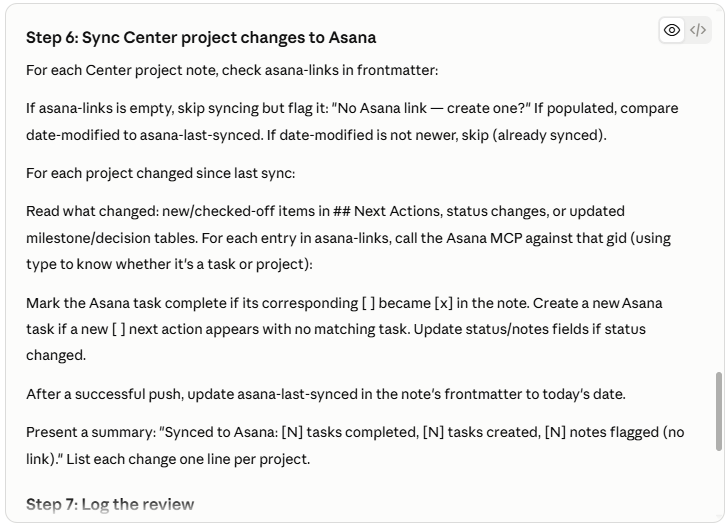
While I haven’t finished this yet, I also need to complete a pull functionality, so that if something changed in Asana, I would receive a notification and could integrate it with my Second Brain. I also need to carefully think through when to close or archive projects on Asana, if that’s something I want to do automatically from my skills or if that’s something I reserve for manual completion. I don’t want to accidently delete somebody’s project through an error on my end.
Building the Google Health Automation
For years, my daily journal has included two things I track by hand: how I slept the night before and how much exercise and walking I did the day before. Both numbers are captured by Fitbit watch and live in Google Health. Every morning, I’d open the app, find the numbers, and type them into my journal myself.
It’s a small task, but it’s exactly the kind of small task a second brain should handle for you. So I asked a question. Could I pull this data automatically, straight from Google Health, instead of transcribing it by hand every morning?
It helped that I understood basic technology terminology such that I knew how to approach this. But I could have asked Claude to dumb down its responses to my questions so that even a newbie could understand.
The Claude Conversation
I started by asking Claude:
I’m trying to figure out how to access my Google Health data to let it populate my morning journal. I don’t see a plugin to do that. Help me walk through my options.
It responded with four options, 1) Google Health CLI, 2) Google Takeout, 3) Third-party export tools, or 4) MCP registry check. It then analyzed the four options for me and recommended #1. In hindsight, my original question was not precise enough, because it missed an option that I ended up using. I should have specified that I wanted my morning Daily Journal skill to do this automation. More on that later.
Option 1 required me to build an application for my desktop using CLI (Command line interface). That seemed like the natural path, since the data ultimately needs to reach a Windows machine anyway. But it didn’t work. Claude Cowork had no way to access a desktop app running locally. The two environments simply couldn’t talk to each other.
That’s a useful thing to know about working with Cowork. It operates in its own sandbox, and if you want it to reach outside of a document or a URL, you need a bridge it can actually use.
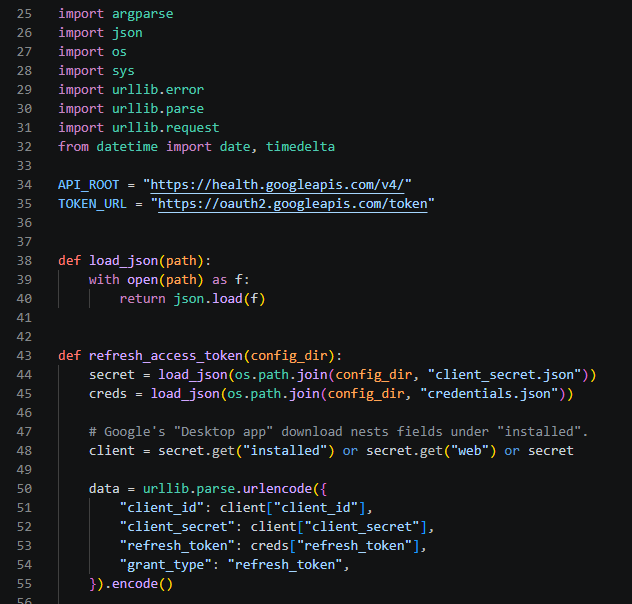
After discussing this limitation with Claude and adding new context, it suggested a different approach: write a Python script it could run itself, one that would connect directly to the Google Health API and pull the data programmatically. That reframing made immediate sense, as I’m more familiar with APIs and how they work. Instead of building an external app that Cowork would need to reach into, I’d build code that Cowork could run on its own and return data it could process itself.
So that’s what we did. I asked Claude to write the python script that hooked up the connection to the Google Health API. It accomplished this using best practices in API connections and Google’s API documentation in under 270 lines of code.
The Expected Snag
Of course, no API integration goes smoothly on the first try, as students of my old web app class observed first hand, and this one was no exception. I ran into a handful of authentication issues along the way, the kind of problems anyone who’s connected to an external API will recognize immediately. Nothing dramatic, just the standard back and forth of getting credentials and permissions configured correctly.
Fortunately, Claude helped me work through them one at a time. It knew enough about the Google Console interface to direct me to exact locations and steps to take to make the adjustments I needed. Finally, the script ran clean. It connected to Google Health and pulled my sleep and activity data. Now I have it feeding into my daily journal without me touching a single number by hand.
Automated Pipelines
These connections make interacting with Claude Cowork and ChatGPT Work extremely useful for personal productivity. They can automate parts of complex work pipelines, handling repeatable, information dense bottle necks, so that you can focus on the work items that require your judgment and taste.
While my Google Health connection was a more complex than most knowledge workers could do quickly, its not out of reach. And with Claude’s (and ChatGPT’s) integrated connectors, all kinds of automations can be accomplished quickly and easily. I could connect with my emails, my calendar, and my cloud storage to accomplish a much cleaner and richer productivity system. Luckily, I have a summer’s worth of time to keep experimenting.